![[+] – zer0space.html – [+]](http://zer0space.me/wp-content/uploads/2025/04/zzz.png)
OSI Model of Networking
The OSI (Open Systems Interconnection) model is a framework that explains how different systems communicate over a network. It was developed by the International Organization for Standardization (ISO) and consists of seven layers, each with specific functions and responsibilities. Each layer handles a different task in network communication and interacts with the layers above and below.
The OSI model is more theoretical than practical. Its a way conceptualize how data moves across a network. When sending information, the data starts at layer 7 (Application) and moves down to layer 1 (physical). When receiving information, the data goes from layer 1 to layer 7. So to send data from one computer to another, the data would go from layer 7 of the sending machine down to layer 7 of the sending machine, over to layer 1 of the receiving machine, and back up to later 7 of the receiving machine.
When doing basic troubleshooting, it is best to start from layer 1 and move towards 7. The layers from 1 – 7 are physical, data-link, network, transport, session, presentation, and application. A good mnemonic I use, going from layer 1 to 7, is Please Do Not Teach Students Pointless Acronyms.
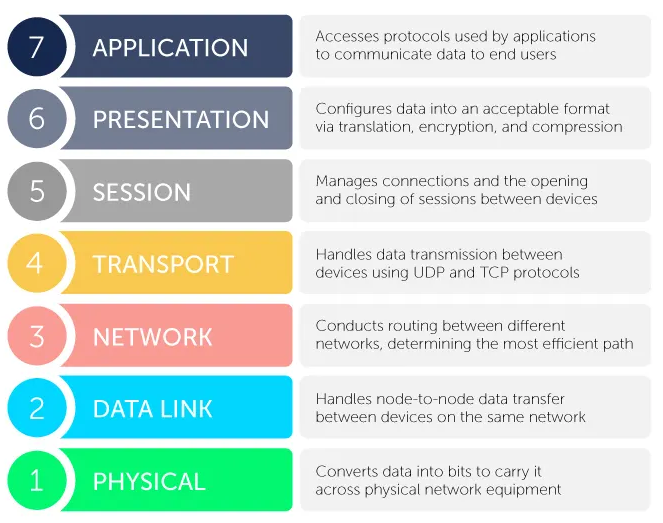
Layer 1 is the physical layer (1). This is the physical network cables, wires, and other physical equipment for data transfer. The data-link (2) handles node to node devices within the same network. This is the layer on which switches operate. Switches separate devices by MAC address, which is the physical location of the computer. Anything with a network interface card (NIC) has a MAC address, which is made up of 6 octets. The first 3 are vendor specific and will be the same across all models from the same manufacturer. The last 3 octets are specific to the device. The network (3) layer is where your routers live. This layer is where you will find the IP address. The transport (4) layer is where we find TCP, UDP, and the 3 way handshake. The session (5) layer is responsible for establishing a connection between devices. The presentation (6) layer is where data is translated or encrypted/decrypted into a format that can be easily compressed/processed for the application layer, such as .jpg, .mov, .mp3, .png, etc. The application (7) layer is the user interface. This layer is used directly by users to send, receive, and manipulate data, such as HTTP, SMTP, and any other interfaces the user interacts with directly.
Networking Basics
IP Addresses
The following IP addresses are reserved for private use and not on public internet.
| Network Class | Network Numbers | Network Mask | # of Networks | # Hosts/ Network |
|---|---|---|---|---|
| A | 10.0.0.0 | 255.0.0.0 | 126 | 16,646,144 |
| B | 172.16.0.0 – 172.31.0.0 | 255.255.0.0 | 16,383 | 65,024 |
| C | 192.168.0.0 – 192.168.255.255 | 255.255.255.0 | 2,097,151 | 254 |
| Loopback (localhost) | 127.0.0.0 – 127.0.0.7 | 255.255.255.0 | __ | __ |
An Internet Protocol (IP) address is a number used to identify specific devices on the internet and within the local network. Routers sort devices by IP address, which means they operate on the network layer (3). Think of it as your digital house number. There’s two types of IP addresses, the second of which was created more recently to compensate for the growing number of networked interfaces/devices..
IPv4:
- Made up of four octets for a total of 32 bits (192.168.0.1)
- Max 255 per octet
- Began in 1983, exhausted in 2010s
- 4,294,967,296 (2^32) possible combinations
IPv6:
- Made up of eight groups of 4 hexadecimal digits each (2001:0db8:0000:0000:0000:8a2e:0370:7334)
- Groups of zeros in a row can be replaced with a double :: (2001:0db8::8a2a:0370:7334)
- Leading zeros can be dropped (2001:db8::8a2e:370:7334)
- 340,282,366,920,938,463,463,374,607,431,768,211,456 (2^128) possible combinations
- Not interoperable with IPv4
MAC Addresses (Physical Address)
MAC addresses are physical addresses that are unique to each device with a NIC. Switches separate data by MAC address, which happens on the data-link layer (2). MAC addresses are made up of 6 octets. The first 3 octets represent the device manufacturer. Every networked device created by a manufacturer will have the same first 3 octets. The last 3 octets are device specific, so different devices from the same manufacturer will have an identical first half of the MAC address and a different last half. Anything with a NIC has a MAC address.
TCP/UDP
Transmission Control Protocol (TCP) and User Datagram Protocol (UDP) operate on the transport later (4). TCP is a connection oriented protocol, which means there will be a confirmation that the connection was received. Some examples of TCP protocols are HTTP/HTTPS, SSH, and FTP). This is the most commonly used protocol scanned by ethical hackers. UDP is a connectionless protocol, which means that the data is sent without waiting for/receiving a confirmation. Some examples of UDP protocols would be DNS, DHCP, streaming services, and VOIP.
3-Way Handshake
The 3-way handshake fundamental process used to establish a reliable connection between a client and a server before data transmission begins. When connecting to a port, for example, you will send a SYN packet (“hi neighbor”). The port will send back a SYN ACK packet (neighbor waves back). Once you establish the connection, you will receive an ACK packet (conversation starts). The 3-way handshake (seen below) looks like this.
SYN > SYN ACK > ACK

Common Ports & Protocols
| Port | Service | Transport Protocol |
|---|---|---|
| 21 | FTP | TCP |
| 22 | SSH | TCP |
| 23 | Telnet | TCP |
| 25 | SMTP | TCP |
| 53 | DNS | TCP/UDP |
| 67, 68 | DHCP | UDP |
| 69 | TFTP | UDP |
| 80 | HTTP | TCP |
| 110 | POP3 | TCP |
| 139, 445 | SMB | TCP |
| 143 | IMAP | TCP |
| 161 | SNMP | UDP |
| 443 | HTTPS | TCP |
This has been a *very* basic overview of the fundamental concepts of networking. Some of these concepts can have entire articles or videos about them. I was going to include subnetting in this, but I feel like that should be its own thing. Also, I am tired of writing at the moment.
Hope this helps!